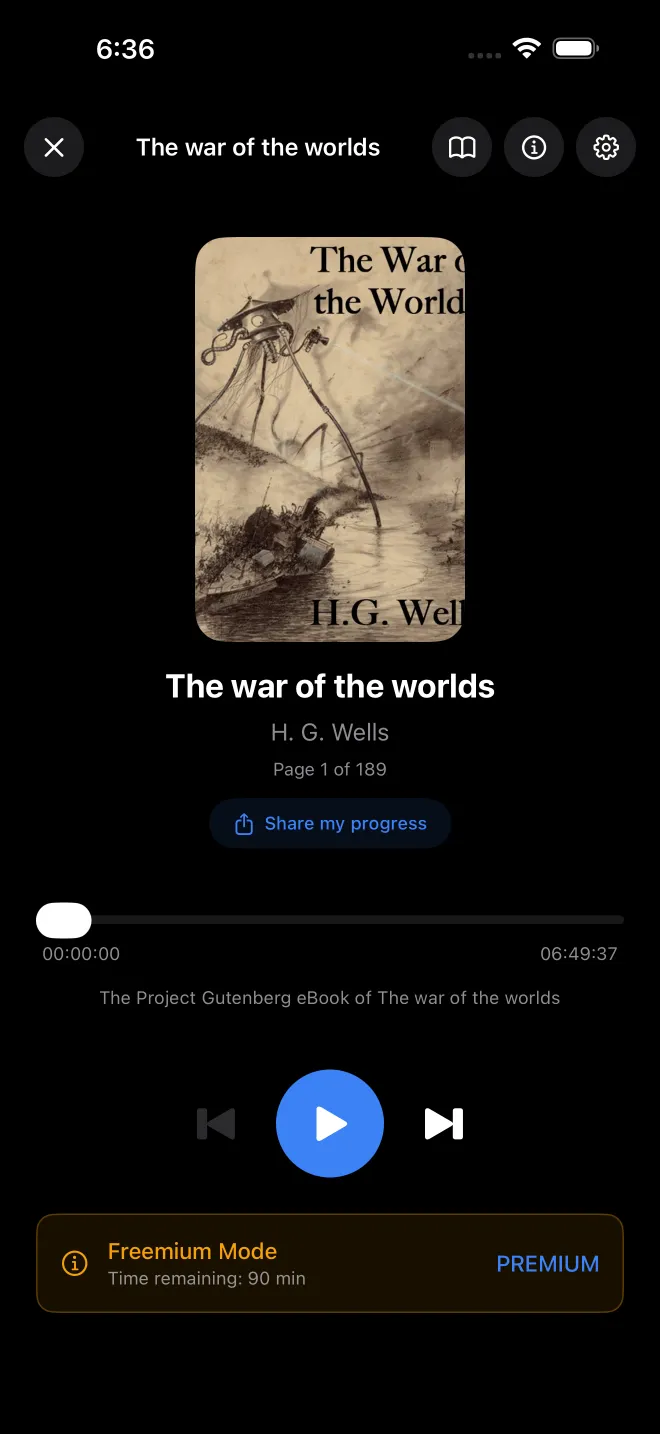
Why the voice stops, and how it comes back
If you came here because reading stopped when you did not expect it, one of these is the likely cause.
| What happened | What VocaRead does | How it restarts |
|---|---|---|
| A phone call, Siri, or another app that takes the audio | Pauses when iOS interrupts it | By itself if iOS reports that playback may resume, otherwise when you press Play |
| Headphones, Bluetooth or CarPlay disconnected | Pauses | Never on its own, so a book does not suddenly carry on through the iPhone speaker |
| Sleep timer ran out | Pauses immediately | When you press Play, from the same point |
| A book used up its 90 free minutes (no Premium) | Pauses, screen off included, and shows a message when you return to the app | With Premium |
| The last page | Stops | The next book starts only if "Automatically play the next book" is on. It is off by default. |
Coming back after an interruption, VocaRead may repeat a little so you can find the thread. A gap under 30 seconds resumes on the same word. From 30 seconds to 10 minutes it steps back one sentence, and from 10 minutes it steps back two. After a lost headphone or car connection it always steps back at least one. "Smart rewind after interruptions", in the player settings, controls this and is on until you turn it off.
Music and a book cannot play together. VocaRead asks iOS for exclusive audio rather than mixing with other apps, a choice made in the app and not something you can change in the settings.
Next and previous mean a page here
The lock screen and Control Center show the title, author, chapter and cover, with play, pause, next and previous. CarPlay and Apple Watch offer the same four. There is no 15-second skip and the progress bar cannot be dragged, because there is no continuous audio file behind them: speech is generated sentence by sentence, and a jump in seconds would not land on anything in the text.
A page is a big step. On the screenshot above, Crime and Punishment has 615 pages and an estimated 23 h 12, a little over two minutes each. To go back a single sentence or pick another chapter, open the app: the text view has a previous-sentence button, and tapping the chapter name in the player brings up the chapter list.
The Home Screen widget (iOS 17 or later) and Siri also control reading, with "Resume reading in VocaRead", "Play or pause VocaRead" and "Next page in VocaRead". All of these bring VocaRead to the foreground, so they will not leave you in the app you were using.
Two ways to the sleep timer
The player settings have a Sleep Timer section with 5, 10, 15, 30, 45 or 60 minutes or "End of Chapter", and it shows the time left. For quick access, touch and hold Play/Pause in an open book (a short tap still only plays or pauses): a panel offers 5, 10 or 30 minutes, 1 hour, or "End of Chapter". While the timer runs, a small moon sits on the button. "Off", in either place, cancels it.
For any other length, use "Start a sleep timer in VocaRead" with Siri or the Shortcuts app: anything from 1 to 180 minutes, 15 if you do not say. A book must already be open in the player.
Some details matter once the lights are out. The voice cuts off when time is up, without fading and possibly mid-sentence. No bookmark is created. Reading resumes where the timer stopped, which can be a long way past the last thing you remember, so you may need to go back a few pages. Pausing by hand does not stop the countdown, and the X that closes the player cancels the timer along with the reading.
"End of Chapter" simply waits for the chapter to change. In a text with no detected chapters it never fires, and jumping to another chapter yourself sets it off too. Chapter lengths vary so much that, for a book you do not know yet, a fixed 30 minutes is easier to predict.
Your place, the battery and the network
The position, down to the page and sentence, is saved every 5 seconds while the voice is playing, and again at each page change and pause. If the app is closed unexpectedly, you lose a few seconds at most.
We have no battery figure to give you because we have not measured one. Generating a voice is more work than playing a finished audio file. To keep that load down, VocaRead stops preparing the following pages as soon as it leaves the foreground and only generates what comes next. That is also why a page skip from the lock screen can take a moment longer: the first sentence of the new page may not be ready yet.
Once a voice is downloaded, listening needs no connection, screen on or off. The offline page has the details.